Works
LiveHashigo
ライブハシゴ

Plan your concert-hopping day just by talking
LiveHashigo helps you plan and get around on days when you hop between several live venues — a "hashigo" day. When you're catching show after show at a circuit event or a multi-band bill, you can see at a glance what order works and whether you'll make the next start time.
The app is available in Japanese only.
APP STOREJust speak to add plans
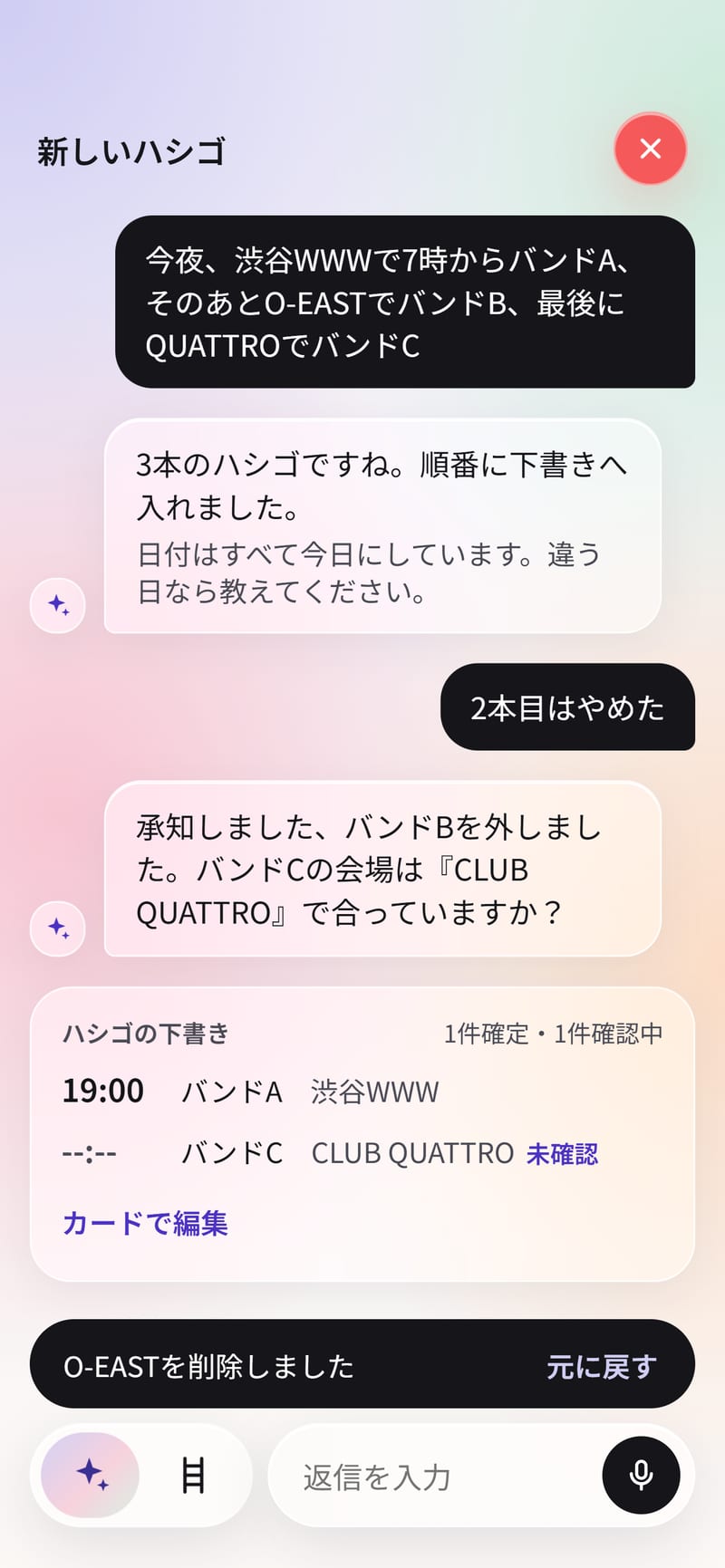
Say the date and time, venue, and performers, and your hashigo plan is ready. You can review the details before saving.
- Price
- Free
- Requires
- iOS 16.4
- Age rating
- 4+
- Category
- Navigation · Music
- Languages
- Japanese
- First released
- 2026-10-09
See your venue route on a map
Your venues appear on the map in order. Walking time from venue to venue is calculated automatically.
Colors show whether you'll make it
The gap between one show's end and the next show's start is compared with the travel time, and shown in colors such as "plenty of time" or "cutting it close." You can also get a rough idea of whether a quick jog would get you there in time.
Navigate to the next venue
Check the time left and your margin to the next venue as you walk.
Just speak to add plans
- Say the date and time, venue, and performers, and your hashigo plan is ready.
- You can review the details before saving.
See your venue route on a map
- Your venues appear on the map in order.
- Walking time from venue to venue is calculated automatically.
Colors show whether you'll make it
- The gap between one show's end and the next show's start is compared with the travel time, and shown in colors such as "plenty of time" or "cutting it close."
- You can also get a rough idea of whether a quick jog would get you there in time.
Leg details
- For each leg, see the walking and train times and the distance.
- Train times are estimates; check Apple Maps for detailed routes.
Navigate to the next venue
- Check the time left and your margin to the next venue as you walk.
Managing plans
- The schedule screen lists your hashigo plans by date.
- Edit or delete plans, or change their date.
About "AI voice scheduling"
There are two ways to add plans: AI Mode, where you build the schedule by talking with the AI, and Quick Input, where you say one sentence such as "Band A at WWW, 7 p.m. tomorrow" and it becomes a schedule card. Either way, everything from building the itinerary to checking transit routes works the same.
AI Mode is available on Apple Intelligence-compatible iPhones (iPhone 15 Pro models, iPhone 16 and later models) running iOS 26 or later, with Apple Intelligence turned on. On devices that don't meet these conditions, you can add plans with Quick Input from the same screen.
No account needed. Your plans stay on your device, and voice input and AI mode are processed on the device too.
For questions about using the app, bug reports, or privacy inquiries, please email the address below.
jun.lin0083@gmail.com※ This app is for iPhone only (iPad is not supported).
※ No account required. Speech recognition is processed on the device.
※ Travel times are estimates and vary with walking speed and crowds.